A guide to understanding how to use dx dy or dz commands to set an exact radius for Minecraft Bedrock edition.
How To Effect An Exact Area In Minecraft
This command is brilliant for getting and exact area of which to effect a player or entity or even block in Minecraft. You can of course set a radius command however this effects blocks in a circular motion around the spot rather than an exact area which you want it to effect. For instance a square, rectangle or other shapes.
Understanding What X Y Z Coordinates Mean
First lets understand the coordinates as you will need to know this before using the dx dy dz in Minecraft to show an excite area.
In bedrock edition you need to switch on your coordinates so you can see where your players coordinates are. You can do this by your pause menu, or you can use the command.
/gamerule showcoordinates true
Once you have them enabled you can see exactly where your player is stood. On the top left you will see 3 numbers for example you might see.
120 60 -190
It goes in this order X Y Z So 120 is on the X axis, 60 is on the Y axis (height) and -190 is on the Z axis.
Now you can identify exactly where your player is on my map. So lets find out how to use this with dx dy dz to effect a specific area.
Using Your DX DY DZ To Plan Radius

So for example lets say green is the X and yellow is Z. The Y is the height of the player so I won’t include it in this map. Lets say the height (Y) is 50 as an example.
The red dot is sitting on X=5 the Y=50 and Z=3 this gives you your exact location.
Now lets say you want to make a cube to the right of where your stood to cover this area (picture below)
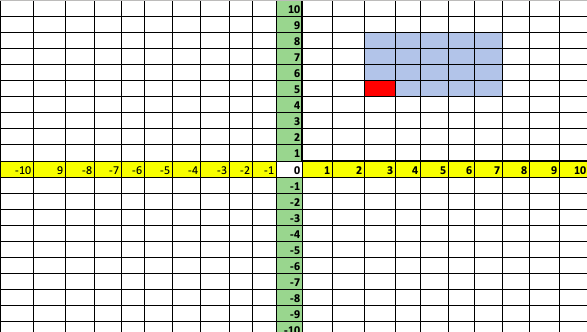
So let’s say you want to give an effect at everyone in this area? Lets find out by doing an effect command.
Lets start the command with /effect @a and now we have to specify the exact location to effect the player.
First we need our coordinates where we start (the red dot) so /effect @a [x=5,y=50,z=3.…..
Now we follow it with the distances away or from the original position. So dx is how far up or down from where we started. If you count up it counts 3 blocks away from the red starting square

Just be aware that if it went downward on the map you would be going in minus, so -1 -2 -3 ect.
Now lets figure out our DY, this is simply the height so lets say we want it to effect everyone from the Block where your feet are to your head. So 3 blocks height should do that. dy=3
Now lets update the command. /effect @a [x=5,y=50,z=3,dx=3,dy=3,dx=?
For the last part we need to figure out what the dx is. As you can see we move in a positive direction 4 blocks to the right.

And again to clarify if it were going toward the left it would be in the minus so -4. How ever we were 4 blocks to the right so dz=4.
/effect @a [x=5,y=50,z=3,dx=3,dy=3,dz=4]
Now for this command lets finish it off with a command to give someone slowness in this area.
/effect @a [x=5,y=50,z=3,dx=3,dy=3,dz=4] slowness 10 10
Now anyone in this area will be effected with slowness for 10 seconds for 10 strength.
You can also effect a different number of people by adding a player count. Leaving it empty will effect everyone but for example if you want it to be for only one person you can finish it with c=1
/effect @a [x=5,y=50,z=3,dx=3,dy=3,dz=4c=1]
Other Examples For The Radius Commands
You can also use this give people items within an area:
/give @a [x=5,y=50,z=3,dx=3,dy=3,dz=4] stone 5
You can use this to teleport players when they reach specific areas:
/tp @a [x=5,y=50,z=3,dx=3,dy=3,dz=4] 100 60 120
Check Out Some Of Our Other Blogs
- Battle Cry of Freedom – Full Review
 0 (0) Battle Cry of Freedom is a Civil War-era multiplayer FPS that offers an incredibly detailed and historically faithful recreation of 19th-century warfare. Developed by Flying Squirrel Entertainment and released in 2022, it was built with clear love for the period — authentic weapons, uniforms, music, and sprawling battlefields all come together to create… Read more: Battle Cry of Freedom – Full Review
 - H1Z1: King of the Kill – Full Review
 0 (0) There was a time when H1Z1: King of the Kill ruled the early battle royale scene. Before Fortnite exploded and before PUBG refined the formula, H1Z1 gave players chaotic, heart-pounding matches where survival was as much about quick thinking as it was about sharp shooting.For a while, it was electric — buggy, broken,… Read more: H1Z1: King of the Kill – Full Review
 - Beyond The Wire – Full Review
 5 (1) Beyond The Wire is a tactical World War I FPS that aimed for realism and atmosphere over flashy gameplay — and in many ways, it succeeded. Built with large-scale battles, gritty environments, and authentic weapon mechanics, the game does a great job capturing the chaos and confusion of trench warfare.At its peak, it… Read more: Beyond The Wire – Full Review
 - Top 5 Minecraft Hide and Seek Servers to Play in 2025
 3.7 (3) Minecraft’s Hide and Seek mini-game is a timeless favourite, offering endless fun and creativity for players of all ages. Whether you’re blending into the environment as a block or hunting hiders with precision, Hide and Seek never gets old. Based on thorough research, including servers found here where you can browse more of… Read more: Top 5 Minecraft Hide and Seek Servers to Play in 2025
 - Free Minecraft A.I. Bot To Answer Questions and Technical Support
 5 (2) Introduction Minecraft is one of the most popular video games in the world. It has been around for over a decade and continues to be a favorite among gamers of all ages. With its vast array of features and possibilities, it can be difficult to keep up with all the changes and updates.… Read more: Free Minecraft A.I. Bot To Answer Questions and Technical Support